Handshake is Winthrop's career management platform for students, alumni, and employers.
Used by 1,500+ colleges and universities, it's an excellent way to recruit early talent
for your organization. There you can:
After verifying your e-mail address, you will be prompted to search for your company
on Handshake and request to join.
If your company is not listed, you will have the option to create a new company profile. If the company e-mail domain is already being used or you would like to create a secondary
company for your specific location (ex: Enterprise - Rock Hill, SC), please e-mail
us at careerdev@winthrop.edu for assistance. Currently, multiple companies cannot be registered under the same
company e-mail domain.
Troubleshooting Tips:
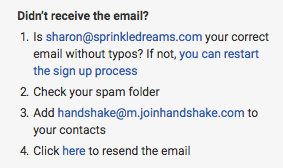
If you're having trouble receiving the confirmation e-mail, check your spam and junk
folders to ensure that e-mails are not being filtered out. Add handshake@m.joinhandshake.com
to your e-mail contacts or address book, and lastly, check with your IT department
and ask them to unblock Handshake or check for quarantined e-mails. Then, resend the
confirmation e-mail once you've taken these steps. You can resend the confirmation
by logging into Handshake and using the link in Step 4 on the right side of your screen,
as pictured here:
You must request to connect with schools before posting jobs and internships there.
We recommend starting with only 10-20 schools until your company is established on
Handshake. For more information, see School Network Management.
Troubleshooting Tips:
Only request a select few schools initially. This will allow you to build positive relationships with schools while also growing
your Trust Score. You can request additional schools as you become approved at your
initial schools.
It can take up to five business days for a school to approve your request. If you do not receive a response within that time frame, contact the Career Services
department at the school. You can find the contact information for a school's Career
Services by selecting Schools in the left hand menu, and then clicking on the name
of the school you wish to reach.
Once you've connected to one or more schools, you will be able to post jobs, request
on-campus interview schedules, manage your applicants, and more. Here are some quick
links to more detailed articles on these topics.
To request CDI-sponsored on-campus tabling, you will create an event in Handshake: instructions for requesting an on-campus table. You may also create an employer-hosted virtual event, which we will review and approve
for our campus community’s access. Visit Handshake documentation linked below to learn
more.
Questions about Handshake? Visit the Handshake Help Center or contact Michael Szeman, Associate Director for Employer Engagement and Internships,
at szemanm@winthrop.edu or 803/323-2141.
Only request a select few schools initially. This will allow you to build positive relationships with schools while also growing
your Trust Score. You can request additional schools as you become approved at your
initial schools.
It can take up to five business days for a school to approve your request. If you do not receive a response within that time frame, contact the Career Services
department at the school. You can find the contact information for a school's Career
Services by selecting Schools in the left hand menu, and then clicking on the name
of the school you wish to reach.