Host Teachers: Enter your school e-mail address and password. If this is your first time logging
in, click “Forgot Password” to receive an email to set your password.
2. Go to “View Student Logs” to access candidate time logs:
Host Teachers: Select your candidate’s name to view their time log entry and select “approve.” If
the candidate needs to adjust their time, select “reject.”
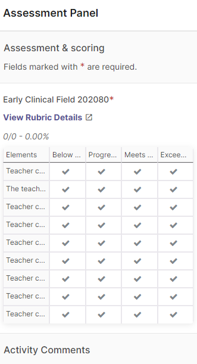
3. Host teachers submit the evaluation for their candidate:
Go to “Activities” and open “View Details” to select the indicators that best describe
the candidate’s performance. If you select “Below” or “Exceeds” Expectations for any indicator, please include comments.
4. When you are finished, go to “Save” and then “Submit.”
Notes for Winthrop Faculty:
If this is a practicum course (not EDCO 200/201/202) make sure that candidates submit
their field experience reflection since host teachers cannot open the evaluation until
this is completed.
When the host teacher submits the evaluation for their candidate it will show as “Done”
and the candidate can now also view the results.
Go to “View Details” to open the evaluation for each candidate in your course.
No further action is needed unless you would like to make changes by selecting “Undo”,
opening the candidate’s evaluation and then “Submit.” Explain to the candidate and
the host teacher why you made the adjustments.